Google search

Monday, October 17, 2011

Tune Aid

 Tune Aid is an unjailbroken Iphone/Ipad/Itouch software that we can use to transfer music and video from Iphone/Ipad/Itouch to your pc.


Normally we can't copy our music and video from itunes..


If you want to try it you can download it
here(Mac) (Windows)

OR

If you want to use it fully you can download here

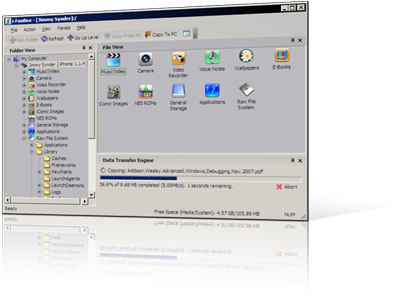
Ifun Box

Ifun Box is an Iphone/Ipad/Itouch jailbroken software that help you to browse all of your Iphone/Ipad/Itouch data in computer.


You can also install Iphone/Ipad/Itouch app witout sync it.
There are still so many things that we can do with Ifun Box....


You can Download it here

Wednesday, August 24, 2011

Virtual Labs Electricity

Virtual Labs Electricity is a program that can be use to make our own virtual electricity project


Click here to download

Sunday, August 21, 2011

Midi Sheet Music

Midi sheet music is a software that can be use to turn .Mid files into .png files

Print Screen :


To download click here


Friday, July 22, 2011

Audacity : Free audio editor and recorder

Audacity is very usefull software to edit and record sound(music)
There are so much thing that we can do with this software

example we can use to make instrumental from some music
(not always have very clean sound good or bad the instrumental depend from the original music)

we can use fade in (opening sound from little sound to original volume)and fade out(ending sound from original volume to little volume)

Change tempo of the sound

etcetera

Windows:
Click here to download

Mac OS X
Click here to download Intel

Click here to dowload PPC

Click here to download Mac OS 9


Enjoy


AlwaysOnTopMaker

Always on top maker is a software that can be use to make the software that we want always on top of the other software

It can be very usefull especially when u want to use cheat/hack the game that the game always make it full screen

You can use Always On Top Maker by click
CTRL-ALT-T to make the software always on top or not always on top
CTRL-ALT-Q to close/ exit the Always On Top Maker

Click here to download

Monday, June 6, 2011

Download swf file from website(firefox)

1. Open the website that contain .swf file you want to download
2. Right click
3. Click view page source
4. Press ctrl+f
5.Write .swf in the search box
6. When you find the file .swf name just download it


For some reason you will not find the .swf file
You can find it by:
1. Right click
2. View page info( goto media tab)
3. Find the .swf file(usually in the type will write Embed)
4. Select it and press Save as


GOOD LUCK

Hide .rar folder in picture

1. Put your files into winrar

2. Place the picture and the winrar archieves in C:/test

3. Open cmd and type
CD\
CD TEST
copy /b filename.jpg+filename.rar


4. And finish(every time you open the file picture it will open like normal picture{just in different size})

5. To open it as .rar
*Right click on the picture file
*Open with
*Search winrar

How to make your own fonts

Always wanted to make a font based on your own handwriting, but didn't know how? Well, here is a tutorial that explains how to convert your handwriting into a personal font.

Besides a computer running Microsoft Windows you will need the following equipment:

We use a template in combination with a printer and a scanner, but there are several other ways to get images of your handwritten character set. For example you could draw characters with a drawing tablet or draw them straight away into your favorite paint software.

FontCreatorThe font editor used in this tutorial is FontCreator from High-Logic. FontCreator has an intuitive interface that allows beginners to become productive immediately and it contains the powerful drawing tools that font designers require to create and edit high-quality TrueType and OpenType fonts. The Home Edition costs $79.00 and has all the features you need to make your own fonts.

Other font editors that can be used to make your own fonts are ScanFont and Fontographer. Fontographer has no demo and hasn't been updated for over a decade, but you can still buy it for $349.00. ScanFont costs $99.00 and has a demo, but it will only work if you've also installed either TypeTool ($99.00), FontLab Studio ($649.00) or AsiaFont Studio ($1999.00), but the demo produces crippled fonts.

Now go make your own font. It takes at least an hour to complete your first font, but it will be worth it. Start the Tutorial.

Thursday, June 2, 2011

How to edit .swf file

SWF Decompiler is a useful program to catch, decompile, extract Shockwave Flash movies and convert SWF to FLA.

Using SWF Decompiler, which is compatible with Flash 8 and ActionScript 2.0 completely, you can find almost everything in a Flash movie!

Due to three aspects, Sothink SWF Decompiler is excellent decompiling tool.

One is friendly interface, one of which is a strong function, the latter is convenient operation.

For interface, Sothink SWF Decompiler has Explorer Panel, which lets users browse hard disk or network to find Flash movies, and also supports to scan your Internet Explorer cache to select a Flash movie that has been seen, and a built-in playback controls can play the movie or element in original size or size matching the window, you can get the expected FLA files by the exporting settings in export dialog. For functions, Sothink SWF Decompiler can import, decompile and convert SWF to FLA in all versions including Flash 8, edit and configure the FLA in Flash as well; can decompile, display and extract all Flash movie elements in groups and select the alternative format, such as Shape, Morph Shape, Image, Sound, Font, Text, Sprite, Button, Frame and Action; information window can show the nature of the selected elements in Flash in detail.

Here are some key features of "Sothink SWF Decompiler":

* Modify SWF to FLA completely and quickly.

* Decompiles the Flash Movie (swf, exe) successfully.

* SWF in all versions can be decompiled and converted to FLA 6.0 or 7.0 or 8.0.

* Supports exporting the Flash movie file (SWF or exe) in FLA format, compatible with Flash 6, Flash 7 and Flash 8.

* Decompiles, display and extract all Flash movie elements in groups, such as Shape, Morph Shape, Image, Sound, Font, Text, Sprite, Button, Frame and Action.

* Can extract the shapes, sounds, images, sprites, fonts, texts and ActionScript from Flash movies.

* Can extract the video file from Flash movie and export in . flv.

* Supports converting swf that contains video to FLA.

* Supports ActionScript 2.0 fully.

* Shows the Script code neatly within the program and can export the ActionScript code while changing the swf to FLA.

* Supports exporting ActionScript in. As the format.

*Support convert swf that contains components to fla file.

* Supports expanding the sprite frame by frame.

* Includes links to convert fonts in the FLA.

* To avoid the movie font is missed in other computer, Sothink SWF Decompiler can convert all found letters to shapes and save them in Library so that you can get the same font result on any computer.

* Has built-in Flash viewer to view and play Flash movies you select.

* Explorer-like interface User-friendly.

* Supplies SWF Catcher for Firefox and IE.

Open files that hidden by virus

1. Open notepad

2. Write :

echo off
echo  may takes several minutes depends the capacity of hidden files, Please wait
pause
echo process
G:
attrib -r -a -s -h *.* /s /d
dir /s
del /s autorun.inf
echo complete  
pause
echo  for exit press any key
pause
exit

3. Save as all files with extension .bat

4. Open it in the folder that you think the lost files hidden
Example( place in my document or in my picture , etc)

5. GOOD LUCK

Remove virus sality

Sality is an computer virus which will infected any files with extension .exe .com and .scr , sality will using your default share folder to spreading in your network area beside that sality using old autorun.inf technique also to spreading. 

Your application will become a little bigger in size around 60kb-80kb after sality infected it.
No need to hide this virus was created in China /Taiwan it have some website list to update himself with new varian some of them pedmeo222nb.info, pzrk.ru, technican.w.interia.pl, www.kjwre9fqwieluoi.info and many more. 

Blocking this site list using hosts file might help you in short condition but after it updated you might in trouble again. like almost smart virus in the past sality have protection to keep him alive in their computer target. Sality will kill any application/website with some string list such as, avast! antivirus, F-Secure Gatekeeper Handler Starter, NOD32krn and many more. 

Sality will blocking your firewall, security notification, and also your computer safe mode.
The easiest way to know if you’re infected by this virus is you can’t boot your computer in safe mode or some application will not run when you open it. When this happen follow this step…..


Remove W32/Sality.AE
1. Disconnected your computer from the network.

2. Turn off “System Restore” when in cleaning process.

3. Turn off “Autorun” and “Default Share” download this file right click on it then choose install.

4. Kill active process in your computer backround and checking your startup file you can use hijackthis.

5. Scan with Norman Malware Cleaner please note because this virus will infected files with extesion .exe com and .scr you have to rename Norman_Malware_Cleaner.exe with new extension example Norman_Malware_Cleaner.cmd

please make sure you downloaded fresh new cleaner from norman official website and don’t run it before you change the extension or this cleaner will got infected first before he can eliminate sality.

6. For repair your computer to booting in safe mode please download this file and merge only one that same with your windows version.
 
7. Repair your registry using this file right click on it then choose install.

8. Reboot your computer and scan again with norman malware cleaner, after that reboot again to make sure your system clean.

GOOD LUCK

REMOVE VIRUS RAMNIT

Spread of the virus can be spelled Ramnit fast.

In fact, because of sophistication that is able to download other viruses, malicious programs are classified as one of the trojan that difficult to eradicate.


Well if your computer is virus ramnit, here are the steps to remove viruses Ramnit by Alfons Tanujaya, an analyst at antivirus Vaksincom Because infected files ending in exe, dll, and html, then cleaning should be done in DOS mode.

To facilitate cleaning please use the Windows Live CD Mini PE, then downlad free tools Dr.Web CureIt!

Ramnit optimal for virus cleaning, we recommend that all media including flash hardsisk and scanned first.
This is because Ramnit will put some storage media.

Before doing the cleaning, you should block viral duplicate files by using the feature 'Software Restriction Policies'.

This feature is only in operating system Windows XP Pro, Vista, 7, Server 2003 and Server 2008. Connect an external flash or any hardsik to the computer.

Then download the application free Dr Web Live CD at the following sites. After Dr Web Live CD in the download, follow the following tips and tricks.

1. Burn into the CD / DVD software Dr.Web LiveCD is already downloaded,

2. Please in-connect the flash and external hardsik

3. Booting computer to computer via CD / DVD ROM

4. This will bring up the screen 'Welcome to Dr.Web LiveCD

5. Select 'Dr.Web LiveCD (Default)' and then press the 'Enter'

6. Wait some time until the interface Dr.Web LiveCD that will display the applications 'Dr.Web Scanner' automatically. Dr.Web Scanner is working to examine your computer from possible virus

7. To scan the hard disk, on screen 'Dr.Web Scanner' select location of the drive to be in check and make sure you check list option 'Scan subdirectories'. If the screen Dr . Web Scanner does not appear double click the icon 'Dr.Web Scanner' found on the Desktop.

8. Then click the [Start] to begin the process of checking

9. Wait a while until the scan is completed. If you find any viruses, Dr.Web will inform the infected file and the type of virus that infects the virus information is available column.

10. Click the [Select All] to select all the objects / files to be in the clear or you can specify which files would you clean it with a check list on the options available

11. Click the [Cure] to clean up files that have been infected with the virus

12. Wait until the cleaning process is completed

13. Scan the computer to ensure clean your computer from viruses

14.Restart the computer.

GOOD LUCK

Sunday, May 29, 2011

Make portable software with winrar

1. Install winrar

2. Open folder that contain all data for the software that you want to make it portable

3. Select all => right click => add to "....rar"

4. Wait untill it finish

5. Open the winrar file

6. Click sfx


7. Advance sfx options


8. In tab general choose create in the current folder

9. Write the software to open in "run after extraction" (winamp.exe, winrar.exe, etc)


10. Go to modes tab choose unpack for temporary folder

11. Choose hide all

12. Choose skip existing files


13. Click ok

14. And winrar will make new files.exe

15. Enjoy

Craagle

Craagle is software that can find serial key, crack, and patch on any program

Normally if we want to search crack, patch or serial key, we have to open webpage one by one

but with this software, we don't need to open the webpage manually

Craagle will find in the web all serial number/key, crack, and patch automatically

Craagle can show software cover to make it easy

If you don't have it you can download here

MP3 GAIN

Mp3 gain is software to play all the song on your computer in same volume


To use MP3Gain on your music collection do the following:
(I) Download and install the latest version of MP3Gain
(II) Once installed select the following options:

  • Options -> Add subfolders
  • Options -> Preserve file date/time
  • Options -> Don’t clip when doing Track Gain Options
(III) Now click on ‘add folder’ or ‘add file’ in the header to add your music files
(IV) Now you need to apply gain. There are two ways of doing this. You can either analyse each track (‘Track Gain’)individually to increase/decrease the volume to your target level. Or, you can analyse each album and apply the gain to the whole album so that the albums average volume hits your target level. I prefer applying ‘Album Gain’ as Artists often deliberately make some tracks louder or quieter. If you don’t tend to listen to complete albums at a time then ‘Track Gain’ is for you.
  • Track Gain: If ‘Track Gain’ isn’t displayed on your toolbar, click the drop-down next to ‘Album Gain’ and select ‘Track Gain’. Then click the ‘Track Gain’ button and let it run (note: for large libraries this could take a while).
  • Album Gain: If ‘Album Gain’ isn’t displayed on your toolbar, click the drop-down next to ‘Track Gain’ and select ‘Album Gain’. Then click the ‘Album Gain’ button and let it run (note: for large libraries this could take a while).
(V) Clipping: If you are lucky, then you won’t need to do this last stage. “Clipping” is when the music hits max volume and gets distorted. This can be present in a file before the gain was calculated, and sometimes applying gain can introduce clipping.
If any of your tracks have a “Y” under the ‘clip(Track)’ or ‘clip(album)’ columns then click Modify Gain’ in the menu bar , and select ‘Apply Max-No-clip Gain for Album. This will physically apply the album gain changes to the file(s).
One final note. If you are a iTunes user, I would recommend turning SoundCheck off. Not only does MP3Gain do a much better job, if you use Soundcheck on files that were already in your music library and you’ve just applied gains, iTunes calculations will now be out. If you’re determined to use SoundCheck, you’ll need to reimport your files again and let iTunes do it’s initial analysis (WARNING – YOU WILL LOSE PLAYLISTS, RATINGS AND PLAYCOUNTS!)

Wednesday, May 25, 2011

Blue Screen

Blue Screen often occurs probably because there is mismatch DLL files or bugs in the operating system kernel.

If there is blue screen, usually Windows will create a small file (although often we do not realize) who reported to us that there is an error on which side.

Indeed spontaneously, blue screen will print the information on the monitor at the time the circumstances they will be, but usually after that, we become panic and confusion which eventually forget to analyze what causes Blue Screen crash occurs they will be, so maybe they will be followed by the appearance of error messages with a countdown to shutdown in Windows so that if the shutdown will not happen more severe damage for example, all the CPU heat increases due to overheating and most fatal is happening electrical shorting in the home / office where we work.


If you are skilled enough in analyzing the messages displayed during a blue screen, a great tool to help save the blue screen of information that can help us analyze and answer why it occurs blue screen.

This tool is named BlueScreenView. Can be downloaded and can be used instantly without any installation process. BlueScreenView environment can run on any Windows> Windows XP / Server 2003/Server 2008/Vista/7. Please analyze damage to computer systems with this tool.


Here are the codes on the screen show a blue / blue screen

1. IRQL_NOT_LESS_OR_EQUAL
blue screen is most often famous because plng often appear. Penyebabbya Because DRIVER PROBLEM WHICH DOES NOT FIT or clashing.
But this blue screen can also be caused by EXCESSIVE YG overclock graphics card. The solution Try to analyze whether you should change your graphics card with the new?
If so, make sure the old VGA driver who removed before installing the new graphics card drivers. DRIVERS MAKE SURE it fits your own graphics card DNG.
If this blue full scr msh happen because you increase your VGA CLOCK, MKA TRY LOWER THE CLOCK VGA

2. INACCESSIBLE_BOOT_DEVICE Spoiler for HANDLE BLUE SCREEN INACCESSIBLE_BOOT_DEVICE: blue screen appears because of the ERROR IN CONFIGURATION JUMPER hard drive. In addition, in the BOOT SECTOR VIRUS, WHICH ONE Controller IDE driver, or ERROR with chipset drivers can also be a culprit. The solution JUMPER on Check Your Hard Disk. Make sure the master or slave configuration. Usually sich Slave configuration, you just need to get off jumpernya.

3. NTFS_FILE_SYSTEM Information or FAT_FILE_SYSTEM
From Error was pictured alone is the cause of this blue screen. Blue screen appears because the FILE SYSTEM WHICH DAMAGED THE HARD DISK. The solution = Try checking HARD DISK DNG open Windows Explorer. Right click HARD DISK DRIVE , then click "PROPERTIES", click "TOOLS", then click "CHECK NOW". In the Tab "error checking", check in Second Option, then click "OK". Restart PC. Try Check the "CABLE HARD DISK". What is already installed with properly. if the blue screen is still  ARISE CBA software which allows you to repair damaged Like File System which Partition Table Doctor.

4. UNEXPECTED_KERNEL_MODE_TRAP
blue screen is caused by overclocking WHICH IS EXCESSIVE, MEMORY PROBLEM, or BIOS . This can be caused by COMPUTER COMPONENTS WHICH TOO HOT. The solution = Lower CLOCK PROCIE and VGA. Check the FAN SPEED  PROCIE and VGA. If Round already low fan then you should replace these fans. If the blue screen is caused by the BIOS , then UPDATE your BIOS. DO NOT FORGET TO MAKE SURE WHICH NEW COMPATIBLE WITH BIOS your motherboard. Check RAM. You can use the software like Memtest86 Memory Testing. If the detected RAM tests were distinguished Troubled , then change the RAM. Before changing the RAM sockets do not forget Notice TYPE ANDCLOCK SPEED

5. The reason is FAILURE WINDOWS UNABLE_TO_LOCATE_DLL
IN DDL execute the file. Can because YG DLL FILE MISSING or BROKEN. Other causes are the presence of the registry file YG UNINTERRUPTED. The solution = You need to prepare the Installer CD Windows to fix this blue screen. BOOT to the CD, then select "Repair".

6. Important Files UNKNOWN_HARD_ERROR
registry can not run because the file is BROKEN or MISSING. Files can be Damaged and Lost because HARD DISK BROKEN. Can also this blue screen appears because the registry is executed MEMORY PLACE Having parity ERROR. Solution = check it with a software RAM tester ram error. Then dislodged RAM troubled. DO NOT FORGET TO CLEAN THE PIN-PIN socket and RAM. If the blue screen still happens try and Fix Windows with installer CD. If the blue screen still occurs THEN REPLACE WITH NEW RAM.

7. STATUS_IMAGE_CHECKSUM__MISMATCH
Messages like this indicate a problem with DRIVERS. In addition to the driver with problem, these errors can be caused by the File System Troubled, Page File Damaged, or damage hardware. Hardware is usually MEMORY DISK

8. BAD_SYSTEM_CONFIG_INFO
blue screen is caused by a distinguished damaged registry file. Troubled RAM can cause this blue screen. Solution = Check and PIN SOCKET RAM. All CLEAN ONLY. If you already Replace, if this blue screen still happens again dislodged TRY ONE OF RAM. If the errors stop, MEMORY WHICH IS YOUR PROBLEM dislodged. If the error still also try to plug the memory lg td disconnected and out of memory the other one to check where the memory lg yg error.KALAU JG STILL ERROR SLOT MEMORY or BOTH OF SUCH NON-PERFORMING MEMORY.

9. Blue Screen PAGE_FAULT_INONPAGED_AREA
this out due to a HARDWARE DAMAGE. As HARD DISK, MEMORY, or VGA. Oh yes, the destruction of L2 cache, PROCIE  causes this blue screen. Solution = If it were not REPLACE or Damaged td SERVICE COMPONENT reply.

10. DATA_BUS_ERROR Data Bus
errors can be caused by some factor. Among them is flawed RAM, L2 CACHE RAM, VGA. Can be caused by RAM CLOCK WHICH IS NOT THE SAME. MBR (Master Boot Record) which was attacked by a virus could be one cause of this blue screen. solution = Using RAM with CLOCK WHICH THE SAME, SCAN YOUR HARD DISK with AntiVirus, Fix MBR with the Windows Installer CD.

11. STATUS_SYSTEM_PROCESS_TERMINATED
Cause you see this message is the disruption of critical processes such as Winlogon or CSRRS. Windows Not for Process Operation ABLE is disturbed. Malware can also cause this blue screen appears. The solution = You can do the System Restore in SAFE MODE. Another option you can repair Windows with the Installer CD .if there is malware, clean Malware.

12. UNMOUNTABLE_BOOT_VOLUME
cause of this message appears because there is an error on the hard drive bootable solution = use windows, go into recovery console, use the command chkdsk fixboot after MOST OF THE FACTORS OF EMERGENCE OF BLUE SCREEN MESSAGE IS DAMAGE OR HARDWARE COMPONENTS disability. BUT NOT TOO RARE PROBLEM ARISING OUT OF OTHER FACTORS SUCH AS: corrupt registry, ATTACK BY VIRUSES AND DRIVERS ARE NOT COMPATIBLE WITH YOUR PC .

Remove New Heur Virus

1. Open new notepad

2. Type

@echo off
echo press any key
echo. & pause
del /f /s /q \*.pif
del /f /s /q \autorun.ini
del /f /s /q %systemdrive%\*.tmp
del /f /s /q %systemdrive%\*._mp
del /f /s /q %systemdrive%\*.log
del /f /s /q %systemdrive%\*.gid
del /f /s /q %systemdrive%\*.chk
del /f /s /q %systemdrive%\*.old
del /f /s /q %systemdrive%\recycled\*.*
del /f /s /q %systemdrive%\Thumbs.dbrem —————————In this part just need one excecute
del /f /s /q %windir%\system.ini
del /f /s /q %windir%\ODBCINST.INI
del /f /s /q %windir%\msdfmap.ini
del /f /s /q %windir%\desktop.ini
del /f /s /q %windir%\control.ini
del /f /s /q %windir%\clock.avi
del /f /s /q %windir%\bootstat.dat
rem ——————————-limit delete command
del /f /s /q %windir%\_default
del /f /s /q %windir%\*.bmp
del /f /s /q %windir%\*.txt
del /f /s /q %windir%\*.bak
del /f /s /q %windir%\prefetch\*.*
rd /s /q %windir%\temp & md %windir%\temp

del /f /q %userprofile%\cookies\*.*
del /f /q %userprofile%\recent\*.*
del /f /s /q “%userprofile%\Local Settings\Temporary Internet Files\*.*”
del /f /s /q “%userprofile%\Local Settings\Temp\*.*”
del /f /s /q “%userprofile%\recent\*.*”
echo your computer now clean from virus
echo. & pause


3 Save as fix.bat

4. Open data in drive that you want to fix (if Drive c and you open it in drive c)

5. And finish

Monday, May 23, 2011

22 XP secret

Defrag Defrag

Secret - Hidden Command Line Switch

Instructions - Go to "Start", "Run" and Type defrag c: -b to defragment the Boot and Application Prefetch information.

Notes - Windows XP will run this automatically every three days or so, during system idle periods. BootVis will evoke this when you run the "Optimize System" function. There is no need to manually run this unless you wish to immediately optimize a newly installed application's load time.


IExpress IExpress

Secret - Hidden Install Creator

Instructions - Go to Start, Run, type iexpress - Source

Notes - IExpress is a technology designed to simplify creation of a setup program. Using the step-by-step IExpress Wizard, you can create self-extracting files that automatically run the setup program contained inside. The setup program can be an .inf file or an executable program. IExpress technology automatically removes the setup files after installation, saving the user time and frustration.


Edit.com MS-DOS Editor

Secret - Hidden Text Editor

Instructions - Go to Start, Run, type edit - Source

Notes - Windows XP comes with another text editor besides Notepad - it's called the MS-DOS Editor, and it's commonly referred to simply as Edit. It has features similar to Notepad, as well as additional features such as the ability to work with multiple text files and change the background and text colors.


Conf Netmeeting

Secret - Hidden Internet Conference Application

Instructions - Go to Start, Run, type conf - Source

Notes - Windows XP is the last version of Microsoft Windows to include NetMeeting. NetMeeting delivers a complete Internet conferencing solution for all Windows users with multi-point data conferencing, text chat, whiteboard, and file transfer, as well as point-to-point audio and video.


Notepad Notepad

Secret - Create a Log File

Instructions - Launch Notepad, Type .LOG on the first line, and then press Enter to move to the next line. On the File menu, click Save As, type a descriptive name for your file in the File name box, and then click OK. When you next open the file, note that the date and time have been appended to the end of the log, immediately preceding the place where new text can be added. You can use this functionality to automatically add the current date and time to each log entry. - Source


Paint Paint

Secret - Image Trails

Instructions - Open an image and hold down Shift then drag the image around to create an image trail.

Secret - 10x Zoom

Instructions - Open an image and select the magnifying glass icon. Left-Click exactly on the line below the 8x.


Eudcedit Private Character Editor

Secret - Hidden Font Editor

Instructions - Go to Start, Run, type eudcedit - Source

Notes - You can use Private Character Editor to create unique letters and logos for your font library.


WinChat Windows Chat

Secret - Hidden Windows Chat Program

Instructions - Go to Start, Run, type winchat - Source

Notes - You can use Windows Chat on your computer to communicate with someone on another computer. Both computers must be connected to the same network (for example, a local area network [LAN] or the Internet). Also, each computer must be running a similar protocol, such as TCP/IP.


mplay32 Windows Media Player 5.1

Secret - Hidden Windows Media Player

Instructions - Go to Start, Run, type mplay32


mplayer2 Windows Media Player 6.4

Secret - Hidden Windows Media Player

Instructions - Go to Start, Run, type mplayer2 - Source

Notes - Windows Media Player 6.4 (Classic) is installed along with Windows Media Player 7. The only update is that it now supports the latest codecs. ^ TOP

Game Secrets

FreeCell FreeCell

Secret - Instant Win

Instructions - Hold down Ctrl + Shift + F10 during game play. Then you will be asked if you want to Abort, Retry or Ignore. Choose Abort, then move any card to instantly win.

Secret - Hidden Game Modes
Instructions - In the "Game" menu choose "Select Game". Enter -1 or -2 to activate the hidden game modes.


Hearts Hearts

Secret - Show All Cards

Instructions - Go to Start, Run, Type: 'Regedit', OK. Edit this registry key:

HKEY_CURRENT_USER\Software\Microsoft\Windows\CurrentVersion\Applets\Hearts

Right click on the Hearts folder, select New, String Value and name it ZB. Right-click on ZB, select Modify and enter a Value Data of 42, OK and close Regedit. Start Hearts (not Internet Hearts). Once in a game Press Ctrl + Alt + Shift + F12 to show all the cards.

Background - This secret is a reference to Douglas Adams' book the Hitchhiker's Guide to the Galaxy. 'ZB' is the initials of the character Zaphod Beeblebrox, the Galactic President. '42' is the answer to The Ultimate Question Of Life, the Universe and Everything.


Minesweeper Minesweeper

Secret - Reveal Mines

Instructions - Minimize or close all running applications. Launch Minesweeper, then type xyzzy. Next hold down either shift key for one second. Now when you move the mouse cursor over a Minesweeper square you will see a tiny white pixel in the top left corner of your desktop screen. This pixel will change to black when your mouse moves over a mine. You may need to change you desktop background to a solid color other than white or black to see the pixel.

Secret - Stop Timer

Instructions - Launch Minesweeper and start a game so the timer starts counting, then press the Windows Key + D to show the desktop. Now when you select minesweeper from the taskbar you can continue playing with the timer stopped.


Pinball Pinball

Secret - Extra Balls

Instructions - Type 1max at the start of a new ball to get extra balls.

Secret - Gravity Well

Instructions - Type gmax at the start of a new game to activate the Gravity Well.

Secret - Instant Promotion

Instructions - Type rmax at the start of a new game to go up in ranks.

Secret - Skill Shot

Instructions - Launch the ball partially up the chute past the third yellow light bar so it falls back down to get 75,000 points. There are six yellow light bars that are worth a varying amount of points:

First: 15,000 points
Second: 30,000 points
Third: 75,000 points
Fourth: 30,000 points
Fifth: 15,000 points
Sixth: 7,500 points

Secret - Test Mode

Instructions - Type hidden test at the start of a new ball to activate Test Mode. No notification will be given that this is activated but you can now left-click the mouse button and drag the ball around. While in test mode press the following keys for more secrets:

H - Get a 1,000,000,000 High Score
M - Shows the amount of system memory
R - Increases your rank in game
Y - Shows the Frames/sec rate

Secret - Unlimited Balls

Instructions - Type bmax at the start of a new ball. No notification will be given that this is activated but when a ball is lost a new ball will appear from the yellow wormhole indefinitely. Once this is activated you will be unable to activate other secrets without restarting the game.


Solitaire Solitaire

Secret - Instant Win

Instructions - Press Alt + Shift + 2 during game play to instantly win.

Secret - Draw single cards in a Draw Three game

Instructions - Hold down CTRL + ALT + SHIFT while drawing a new card. Instead of drawing three cards you will only draw one.
^ TOP

OS Secrets

Add/Remove Add/Remove

Secret - Hidden Uninstall Options

Instructions - Warning: Proceed at your own risk! Browse to C:\Windows\inf\ and make a backup copy of sysoc.inf. Then open the original file C:\Windows\inf\sysoc.inf in notepad. Go to "Edit" and select "Replace". In "Find what:" type ,hide and in "Replace with:" type , then select "Replace All", save and close the file. Go to the "Control Panel", "Add/Remove", select "Add/Remove Windows Components". You will now see many more Windows components to uninstall. Do not remove anything with no label or that you do not recognize or fully understand what it does. Doing so can break certain functionality in Windows.


Control Panel Control Panel

Secret - Hidden Control Panel Extensions

Instructions - Download and install TweakUI, launch, go to "Control Panel" and check any item not selected, then "Apply" and "OK". You will now see the hidden control panel extensions.


Device Manager Device Manager

Secret - Hidden Devices

Instructions - Go to the "Control Panel", "System" icon, "Hardware" tab and select "Device Manager". Select "View" and Show hidden devices.

Secret - Phantom Devices

Instructions - Go to "Start", "Programs", "Accessories" and select "Command Prompt". At the command prompt, type "set devmgr_show_nonpresent_devices=1" and press Enter. At the command prompt, type "start devmgmt.msc" and press Enter. Select "View" and Show hidden devices. You can see devices that are not connected to the computer. - Source

Notes - When you close the command prompt window, Windows clears the "devmgr_show_nonpresent_devices=1" variable that you set and prevents phantom devices from being displayed when you select "Show hidden devices".


MIDI Files MIDI Files

Secret - Hidden MIDI Files

Instructions - Browse to C:\Windows\Media and you will find 3 hidden MIDI files:

flourish.mid
onestop.mid
town.mid


Notes - "MIDI" stands for "Musical Instrument Digital Interface" - A compression format for encoding music.


Music Music

Secret - Music from the Installer

Instructions - Browse to C:\Windows\system32\oobe\images\title.wma and play.

Notes - "OOBE" stands for "Out-of-Box Experience".


Shutdown Shutdown

Secret - Display Hibernate Option on the Shut Down dialog

Instructions - Go to "Start", "Turn Off Computer..." and press either Shift key to change the "Stand By" button to "Hibernate".


Support Tools Support Tools

Secret - Over 100 Windows XP Support Utilities are on the install CD

Instructions for Pre-SP2 users - If you do not have SP2 installed, put the original Windows XP CD in the CD-ROM Drive, run the D:\Support\Tools\setup.exe file.

Instructions for SP2 users - If you have SP2 installed, Download the Windows XP Service Pack 2 Support Tools and install.

Saturday, May 21, 2011

Make user can not access windows at a certain time

1. Open command prompt (windows+r, type cmd)

2. Type
net user..../time:M-F,19:00-24:00

3.Its mean block net user.... on Monday to Friday and at 7 o'clock until 12 o'clock

4. If you don't know the user you can type net user in command prompt